
Business Presentation Skills & Language Games, Worksheets & Activities
Presentations Pelmanism
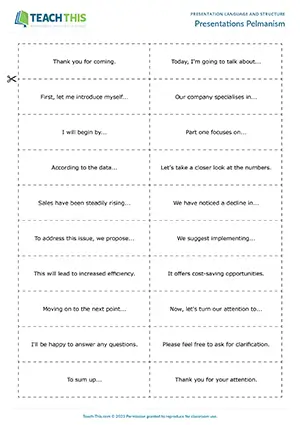
Business English Presentation Language Game - Vocabulary: Matching, Pelmanism - Group Work
In this free business presentations language game, students match presentation expressions to parts of a presentation. In pairs, students take turns turning over one presentation card and one...
Presentation Scramble

Business English Presentations Game - Vocabulary and Reading: Unscrambling, Gap-fill - Speaking Activity: Delivering a Presentation, Freer Practice - Pair Work
In this fun presentation language game, students race to put words in the correct order to make presentation and signposting phrases and then use them...
Sales Pitch Pro
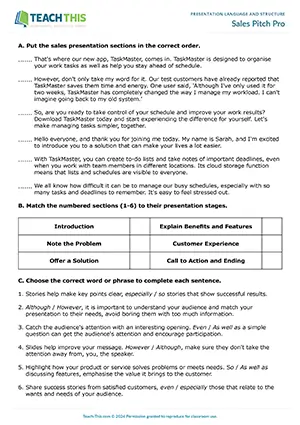
Business English Presentation Worksheet - Reading Exercises: Ordering, Matching - Vocabulary Game: Forming Sentences - Speaking Activity: Presenting - Pair Work
This engaging presentation language worksheet, game and activity helps students learn and practice a wide range of language for each stage of a sales...
Plan and Present
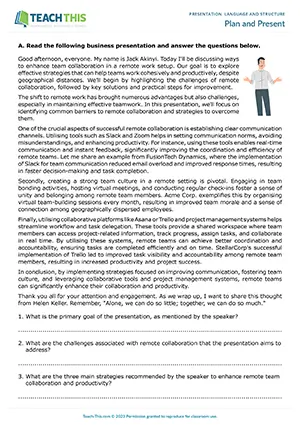
Business English Presentation Activity - Reading and Writing: Comprehension Questions, Outlining - Speaking Activity: Presenting, Fluency Practice - Pair Work
In this business presentation structure activity, students complete a reverse outline of a business presentation, and then plan and present their own business...
Presentation Vocabulary Challenge
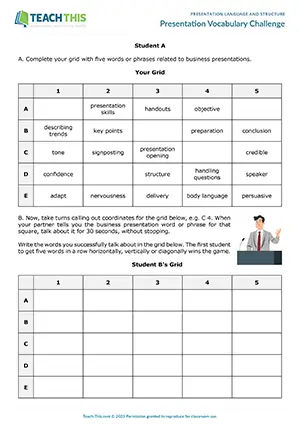
Business English Presentation Language Game - Vocabulary and Speaking: Impromptu Speech - Pair Work
In this enjoyable business presentation vocabulary game, students talk about words or phrases related to business presentations for 30 seconds. First, students add five business presentation words...
Signposting a Presentation
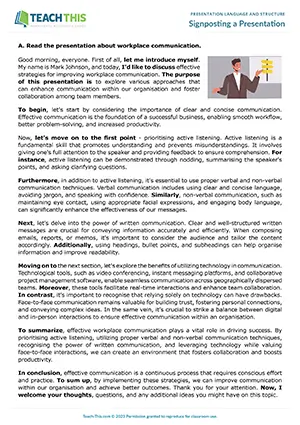
Business English Presentations Worksheet - Reading, Vocabulary and Writing Exercises: Categorising, Writing a Presentation - Speaking Activity: Delivering a Presentation
This useful signposting language worksheet helps students practice different types of signposting language for a business presentation. First, students...
The Four-Part Pitch

Business Presentations Worksheet - Reading and Writing Exercises: Identifying, Matching, Gap-fill - Speaking Activity: Delivering a Presentation, Freer Practice - Pair Work
In this productive elevator pitch worksheet, students learn about effective elevator pitches, explore essential phrases for each section, and create and...
Using Business Presentation Language
Business presentation language helps speakers introduce a topic, connect ideas and guide an audience towards a conclusion. Clear signposting shows listeners where the talk is going and how each point relates to its purpose.
This page contains seven resources across B1 and B2, including games, worksheets and speaking activities, with one free game. They cover presentation expressions, signposting, planning, sales presentations and elevator pitches.
The table shows language for different parts of a business presentation.
| Presentation function | Purpose | Example language |
|---|---|---|
| Introduce the topic | Tell the audience what the talk concerns. | 'Today, I'd like to talk about our customer feedback process.' |
| Outline the structure | Give listeners a route through the main points. | 'First, I'll explain the current process. Then, I'll discuss two possible changes.' |
| Move to another point | Mark a change of focus. | 'Let's now move on to the second option.' |
| Give an example | Make an idea more concrete. | 'For example, customers could send feedback through a short online form.' |
| Summarise the main points | Bring the key ideas together. | 'To sum up, we've looked at the current process and two possible changes.' |
| Invite questions | Give the audience an opportunity to clarify or discuss. | 'What questions do you have about these options?' |
How to Structure a Business Presentation
Open with a purpose and a route: State the topic and what the audience should understand by the end. For a longer talk, briefly outline the main sections. For a short pitch, keep the opening proportionate so there is time to explain the central idea.
Develop points in a clear order: Group related ideas and support them with relevant explanations or examples. Choose signposting that reflects the relationship between points, such as adding information, giving an example or changing focus, rather than inserting linking phrases without a purpose.
Close by returning to the main message: Summarise the points the audience needs to retain and connect them to the presentation's purpose. Where appropriate, finish with a proposed next step or an invitation for questions, keeping proposals distinct from actions already agreed.
3-Step Framework for Teaching Business Presentations
The first two stages develop presentation phrases and their use in a sales presentation at B1. The final B2 stage extends planning into a short professional pitch with peer feedback. Use these stages across lessons according to learners' levels and presentation needs.
1. Build Phrases and Place Them in Context: Pairs race to order words into presentation and signposting phrases, then complete a presentation text with them. They finish by preparing and delivering a short talk on a chosen topic. This connects phrase formation with its place in a complete presentation before more focused work on presentation stages.
2. Connect Stages with a Clear Message: Students order a sales presentation, identify its stages and choose connectors. In a paired card game, they match expressions to stages and complete them with their own ideas before preparing a presentation for a new product or service. This develops the link between an organised sequence and the content students want to communicate.
3. Prepare a Short Pitch and Review It: Students identify the sections of a four-part elevator pitch, match expressions to those sections and complete a model. They then use a supplied professional scenario or their own situation to prepare a 30-to-60-second pitch. A partner's checklist feedback on content and language provides a basis for discussing how clearly the structure supports the message.
Common Mistakes with Business Presentation Language
Omitting to before the listener after explain: When naming both the information and its recipient, use explain something to someone. Incorrect: 'I'll explain you the process.' Correct: 'I'll explain the process to you.'
Using a signpost that does not match the next idea: A conclusion phrase tells the audience that the talk is drawing together points already discussed. Misleading transition: Saying 'To sum up' before introducing a second option that has not been discussed. Clearer transition: 'Let's now look at the second option.'
Common Questions About Teaching Business Presentations
What game helps practice presentation language?
The free game Presentations Pelmanism connects presentation expressions with the stages where they belong. Students turn over a presentation card and an expression card, reading matching pairs aloud and keeping them for another turn. Collecting pairs combines a memory challenge with recognising each expression's function, while the final class check invites alternative expressions.
What worksheet helps teach presentation signposting?
The worksheet Signposting a Presentation shows how speakers guide an audience through their ideas. Students identify eight signposting functions and categorise expressions from a model presentation. They then brainstorm, write and deliver a short presentation using the language, moving from recognising organisational signals to applying them in their own talk.
What activity helps practice presentation structure?
The activity Plan and Present asks students to turn a model business presentation into an outline in note form. They then choose a topic and plan their own presentation. Delivering it to three different partners through a 4-3-2 fluency activity gives students repeated speaking practice using the structure they have prepared.
Become a Teach This Member
Get unlimited access to the full library, plus new resources added every week.
Unlimited Resource Access
Download from 3000+ worksheets, activities, and games.
Save 5+ Hours Weekly
Cut lesson prep time with ready-to-use resources, plus teacher notes and answer keys.
Trusted Professional Quality
Classroom-tested, editable resources created by experienced ESL professionals.
Fresh Content Weekly
Get 5 new resources added to the library each week.
Here's what our members are saying...


