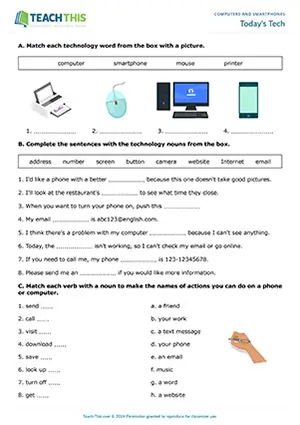
Today's Tech

Elementary (A1-A2) 25 minutes
ESL technology worksheet preview for elementary A1-A2 students featuring vocabulary exercises, matching, gap-fill, and speaking activities

ESL Technology Worksheet - Vocabulary Exercises: Matching, Gap-fill, Sentence Completion - Speaking Activity: Asking and Answering Questions - Pair Work

This comprehensive technology vocabulary worksheet helps students practice words related to computers, smartphones and the Internet. Students begin by...

ESL Technology Worksheet - Vocabulary Exercises: Matching, Gap-fill, Sentence Completion - Speaking Activity: Asking and Answering Questions - Pair Work This comprehensive technology vocabulary worksheet helps students practice words related to computers, smartphones and the Internet. Students begin by matching technology words with pictures. Students then complete sentences with technology nouns from a box. Next, students match each verb with a noun to form the names of actions that can be done on a phone or computer. After that, students underline the correct technology word or phrase to complete each sentence. Students then move on to complete technology-related sentences with their own ideas and then compare them with a partner. Lastly, students ask and answer technology conversation questions in pairs.

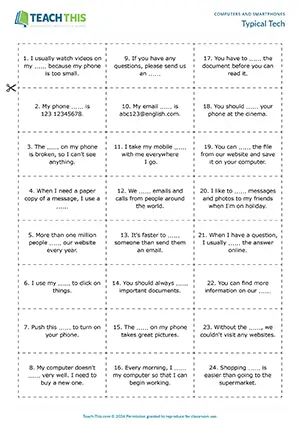
Typical Tech

Elementary (A1-A2) 30 minutes
ESL technology vocabulary games preview for elementary A1-A2 students featuring matching, gap-fill, and sentence activities

ESL Technology Vocabulary Games - Vocabulary and Speaking: Matching, Gap-fill, Forming Sentences, Freer Practice - Group Work

Here are two enjoyable technology vocabulary games to help students practice basic vocabulary related to computers, smartphones and the Internet...

ESL Technology Vocabulary Games - Vocabulary and Speaking: Matching, Gap-fill, Forming Sentences, Freer Practice - Group Work Here are two enjoyable technology vocabulary games to help students practice basic vocabulary related to computers, smartphones and the Internet. In groups, students take turns picking up a sentence card, reading it aloud, and placing it face-up on the table. Next, all the students race to find a technology-related word card to complete the sentence. When a student finds the right card, they pick it up and read the complete sentence aloud. If the other students agree the word matches the sentence, the student wins and keeps the cards. If not, the student puts down the word card and is out of the round. The student with the most pairs of cards at the end wins. Students then move on to a second game where they make sentences with the word cards. Students take turns turning over a word card, so it's visible to everyone. Students then race to put up their hands and say a sentence using the technology-related word. If a student makes a suitable sentence, they win and keep the card. If the sentence is incorrect, or if a student says a sentence before putting up their hand, they are out of the round, and the other students continue trying to come up with a sentence. The student with the most cards at the end of the game wins.

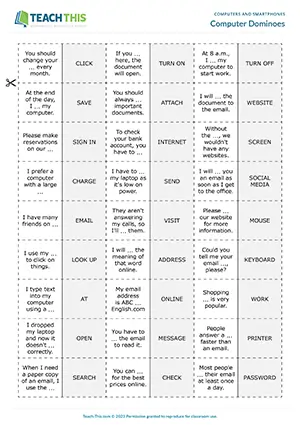
Computer Dominoes

Pre-intermediate (A2) 20 minutes
ESL computers vocabulary game preview for pre-intermediate A2 students featuring matching and gap-fill domino activities

ESL Computer Vocabulary Game - Vocabulary: Matching, Gap-fill - Group Work

In this useful computer vocabulary game, students play dominoes by completing sentences with computer-related words. In groups of three, the first player puts down one of their dominoes on either side of the domino on the table, making sure...

ESL Computer Vocabulary Game - Vocabulary: Matching, Gap-fill - Group Work In this useful computer vocabulary game, students play dominoes by completing sentences with computer-related words. In groups of three, the first player puts down one of their dominoes on either side of the domino on the table, making sure that the computer-related word completes the gap-fill sentence. Players then take it in turns to complete the computer-related sentences with words by putting their dominoes down at either end of the domino chain. If a player cannot put down one of their dominoes, they take one from the top of the pile and put it down if they can. If there are no dominoes left in the pile, play passes to the next student. The first player to get rid of all their dominoes wins the game.

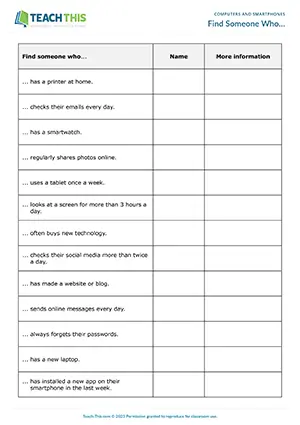
Find Someone Who…

Pre-intermediate (A2) 25 minutes
ESL computers, smartphones and gadgets activity preview for pre-intermediate A2 students featuring speaking and question prompts

ESL Computers, Smartphones and Gadgets Activity - Speaking: Asking and Answering Questions, Controlled and Freer Practice

In this insightful computers and smartphones speaking activity, students ask and answer questions about computers, smartphones, and gadgets. After reviewing the items on the worksheet, students go...

ESL Computers, Smartphones and Gadgets Activity - Speaking: Asking and Answering Questions from Prompts, Controlled and Freer Practice In this insightful computers and smartphones speaking activity, students ask and answer questions about computers, smartphones, and gadgets. After reviewing the items on the worksheet, students go around the class, asking each other the questions on the worksheet, e.g. 'Do you have a printer at home?' When a student finds someone who answers 'yes' to a question, they write down that student's name and ask a follow-up question to gain more information, noting down the answer in the last column. When everyone has finished, students give feedback to the class on what they found out.

Tech Talk

Pre-intermediate (A2) 30 minutes
ESL computers and smartphones activity preview for pre-intermediate A2 students featuring unscrambling and question activities

ESL Computers and Smartphones Activity - Speaking: Unscrambling, Asking and Answering Questions, Controlled and Freer Practice - Group and Pair Work

In this free computers and smartphones speaking activity, students unscramble questions about computers or smartphones and then ask and answer...

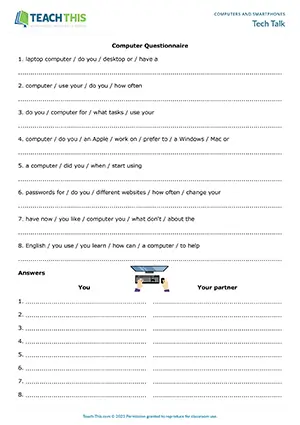
ESL Computers and Smartphones Activity - Speaking: Unscrambling, Asking and Answering Questions, Controlled and Freer Practice - Group and Pair Work In this free computers and smartphones speaking activity, students unscramble questions about computers or smartphones and then ask and answer the questions with a partner. In two groups, students put words in the correct order to form questions about computers or smartphones. Students then answer the questions and write down their answers on the worksheet. After that, students pair up with someone from the other group and take it in turns to ask their partner the questions, noting down their answers. Finally, students report back to the class on what they found out about their partner.

Byte-sized Vocabulary

Intermediate (B1) 30 minutes
ESL computers and smartphones worksheet preview for intermediate B1 students featuring vocabulary matching, gap-fill, and pair speaking activities

ESL Computers and Smartphones Worksheet - Vocabulary Exercises: Matching, Binary choice, Gap-fill - Speaking Activity: Asking and Answering Questions - Pair Work

Here is a productive computer and smartphone vocabulary worksheet to help students learn and practice verbs and nouns related to computers and...

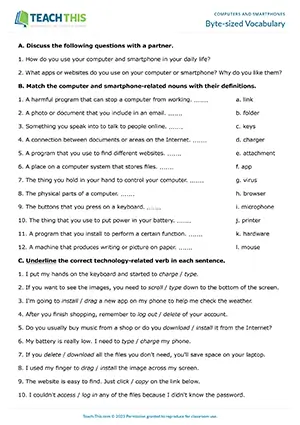
ESL Computers and Smartphones Worksheet - Vocabulary Exercises: Matching, Binary choice, Gap-fill - Speaking Activity: Asking and Answering Questions - Pair Work Here is a productive computer and smartphone vocabulary worksheet to help students learn and practice verbs and nouns related to computers and smartphones. In pairs, students start by discussing two questions related to using computers and smartphones. Students then match computer and smartphone-related nouns with their definitions. Next, students underline the correct technology-related verbs in a set of sentences. After that, students match sentence halves together to form sentences about computers and smartphones. Lastly, students complete sentences with words from a box in their correct form.

Smart Pairs

Intermediate (B1) 25 minutes
ESL computers and smartphones game preview for intermediate B1 students featuring matching and gap-fill group activities

ESL Computers and Smartphones Game - Vocabulary - Matching, Gap-fill - Group Work

Here is an engaging computers and smartphones vocabulary game to help students practice or review computer and smartphone vocabulary. In groups, students take turns turning over...

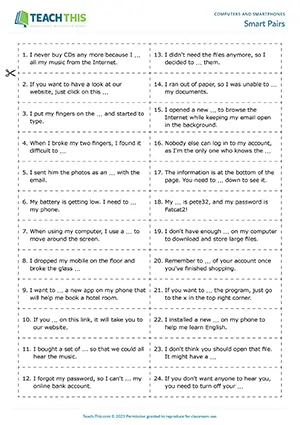
ESL Computers and Smartphones Game - Vocabulary: Matching, Gap-fill - Group Work Here is an engaging computers and smartphones vocabulary game to help students practice or review computer and smartphone vocabulary. In groups, students take turns turning over one sentence card and one word card. If the computer or smartphone-related word completes the sentence, the student reads the sentence aloud, keeps the two cards and has another turn. If the word doesn't match the sentence, the student turns the cards back over, keeping them in the same place. It's then another student's turn to play. The student with the most pairs of cards at the end of the game wins. Afterwards, check the correct answers with the class.

Tech Verb Take One

Intermediate (B1) 35 minutes
ESL computers and smartphones game preview for intermediate B1 students featuring gap-fill and speaking group activities

ESL Computers and Smartphones Game - Vocabulary Game: Gap-fill - Speaking Activity: Asking and Answering Questions, Controlled and Freer Practice - Group Work

In this fun computer and smartphone verbs game, students race to collect verb cards and use them to complete, ask and answer questions. To begin...

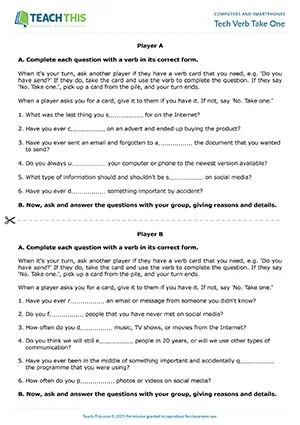
ESL Computers and Smartphones Game - Vocabulary Game: Gap-fill - Speaking Activity: Asking and Answering Questions, Controlled and Freer Practice - Group Work In this fun computer and smartphone verbs game, students race to collect verb cards and use them to complete, ask and answer questions. To begin, students read their worksheets and think about which verbs from the board they need to complete their questions. Player A then begins the game by choosing a question and asking another player if they have the verb card, e.g. 'Do you have send?' If the other player has the card, they give it to the player, who takes it and uses the verb in its correct form to complete the question. If not, the other player replies 'No. Take one.' Player A then takes a card from the pile and their turn ends. Play then passes to Player B and so on. If a player is dealt or draws a verb card that they need, they use their next turn to complete the corresponding question and do not ask for a card. The first player to complete all their questions correctly wins. The remaining players continue the game until all the students have completed their questions. Finally, in their groups, students take turns asking and answering the questions, giving as much detail as possible.

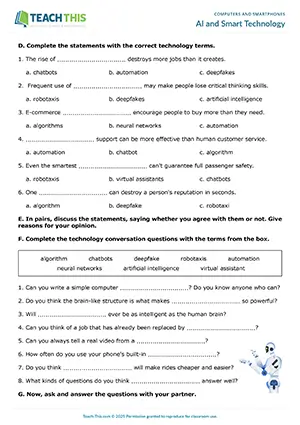
AI and Smart Technology

Upper-intermediate (B2) 30 minutes
ESL smart technology vocabulary worksheet preview for upper-intermediate B2 students featuring matching, binary choice, gap-fill, guided discussion, communicative practice and pair activities

ESL AI Worksheet - Vocabulary Exercises - Matching, Binary Choice, Gap-fill - Speaking Activity - Discussion - Pair Work

This comprehensive technology vocabulary worksheet helps students practice words related to artificial intelligence, machine learning concepts, and emerging technologies. First, students...

ESL AI Worksheet - Vocabulary Exercises - Matching, Binary Choice, Multiple Choice, Gap-fill - Speaking Activity - Guided Discussion, Asking and Answering Questions, Freer and Communicative Practice- Pair Work This comprehensive technology vocabulary worksheet helps students practice words related to artificial intelligence, machine learning concepts, and emerging technologies. First, students match halves together to form sentences related to technology. Students then match technology terms to their definitions. Next, students underline the correct technology term in each sentence. After that, students complete statements by choosing the correct technology terms from the multiple-choice options. Following that, in pairs, students discuss whether they agree with each statement, giving reasons for their opinion. Finally, students complete technology conversation questions with terms from a box and then discuss the questions with their partner.

Caught in the Act

Upper-intermediate (B2) 30 minutes
ESL smartphone vocabulary activity preview for upper-intermediate B2 students featuring gap-fill, story writing, and pair activities

ESL Smartphone Vocabulary Activity - Vocabulary and Writing: Gap-fill, Asking and Answering Questions, Sentence Completion, Story Writing - Group and Pair Work

This handy smartphone vocabulary activity helps students review and practice verbs and nouns related to smartphones. In two groups, students start by...

ESL Smartphone Vocabulary Activity - Vocabulary and Writing: Gap-fill, Asking and Answering Questions, Sentence Completion, Story Writing - Group and Pair Work This handy smartphone vocabulary activity helps students review and practice verbs and nouns related to smartphones. In two groups, students start by completing sentences about people using their phones during a lesson with verbs and nouns from two boxes. Next, students pair up with someone from the other group and take turns asking their partner about the people whose details they are missing. Their partner reads the corresponding information, and the other student completes the sentence on their worksheet. Afterwards, check the answers with the class. Students then move on to choose five verbs and nouns from the two boxes and write a short story to practice the language from the activity. Finally, students share their stories with the class.

Smarter than Smartphones

Upper-intermediate (B2) 30 minutes
ESL smartphones board game preview for upper-intermediate B2 students featuring multiple-choice, guessing, and vocabulary activities

ESL Smartphones Board Game - Vocabulary: Multiple-Choice Questions, Guessing, Providing Vocabulary - Group Work

Here is an entertaining smartphone vocabulary board game to help students practice words related to smartphones. Students take turns rolling the dice and moving their counters along...

ESL Smartphones Board Game - Vocabulary: Multiple-Choice Questions, Guessing, Providing Vocabulary - Group Work Here is an entertaining smartphone vocabulary board game to help students practice words related to smartphones. Students take turns rolling the dice and moving their counters along the game board. If a student lands on a question mark square, another student picks up a card and reads the question on the card, followed by three multiple-choice options. If the student chooses the correct answer, they remain on the square. If not, they move their counter back two squares. The card is then placed at the bottom of the pile, and it's the next student's turn to roll the dice. If a student lands on a square beginning with 'Name two...', they have 15 seconds to name the two things required in order to remain on the square. If they are unsuccessful, they move their counter back two squares. The first player to reach the finish wins the game.

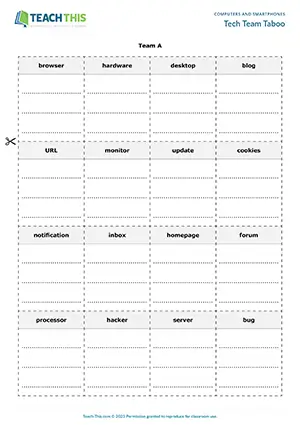
Tech Team Taboo

Upper-intermediate (B2) 30 minutes
ESL computer vocabulary game preview for upper-intermediate B2 students featuring word association, describing, and guessing activities

ESL Computer Vocabulary Game - Vocabulary and Speaking: Word Association, Describing, Guessing, Freer Practice - Group Work

In this creative computer vocabulary game, students describe and guess computer nouns without using associated words their opponents have prohibited...

ESL Computer Vocabulary Game - Vocabulary and Speaking: Word Association, Describing, Guessing, Freer Practice - Group Work In this creative computer vocabulary game, students describe and guess computer nouns without using associated words their opponents have prohibited. First, in two teams, students look at each card and discuss how they would describe the computer noun shown on the card. Students then think of and write down three keywords associated with the computer noun on each card. The two teams then swap cards. Next, a student from Team A picks up a card and has 30 seconds to describe the computer noun to the other students in their team, without saying the noun or using the keywords on the card. The student is also not allowed to use variations of the words on the card, e.g. browsing instead of browser. If the team guesses the computer noun before the time is up, they win and keep the card. If not, the card is removed from the game. Play then passes to the other team, and so on. The team with the most cards at the end of the game wins.

Using Computer and Smartphone Vocabulary

Computers and smartphones vocabulary covers the words, verbs, and phrases people use to talk about devices, apps, and online actions in everyday life. Students who lack this vocabulary struggle to describe basic digital tasks clearly, which holds back their ability to communicate naturally in both spoken and written English.

This page covers computers and smartphones vocabulary across A1-A2, A2, B1, and B2 levels, with twelve resources including worksheets, speaking activities, vocabulary games, and a board game, with one activity available as a free download.

When to Use Computer and Smartphone Vocabulary

Describing device problems: When something goes wrong with a device, speakers need precise vocabulary to explain the issue clearly to tech support or a repair shop, such as telling someone that a laptop 'won't connect to the Wi-Fi' or that a phone 'keeps freezing on startup.'

Discussing digital habits in conversation: Everyday conversation regularly turns to how people use their phones and laptops, so learners need vocabulary for talking about habits like how much time they spend on social media, which apps they rely on, or whether they 'back up their files regularly.'

Following and giving tech instructions: Workplaces and classrooms regularly require people to follow or pass on step-by-step instructions for digital tasks, making vocabulary like 'right-click,' 'scroll down,' and 'tap to confirm' essential for anyone who needs to guide or be guided through a process.

3-Step Framework for Teaching Computer and Smartphone Vocabulary

1. Build the Vocabulary Foundation: Start by giving students structured exposure to the key words before asking them to produce anything. A worksheet that opens with matching technology words to pictures, then moves into completing sentences with technology nouns from a box, and then asks students to pair each verb with a noun to form the names of actions they can do on a phone or computer gives learners a logical progression from recognition to use.

2. Put the Verbs to Work: Once students know the vocabulary, a card game that forces them to actively retrieve specific tech verbs locks the words in fast. Players ask each other for the verb card they need to complete a gap-fill question on their worksheet, for example calling out 'Do you have send?' and then using the verb in its correct form when they receive it. If a player is denied the card, they hear 'No. Take one.' and draw from the pile instead, keeping everyone engaged throughout.

3. Push for Fluency Under Pressure: For the final stage, a team description game that forces students to talk around words they cannot say builds the kind of flexible vocabulary knowledge that sticks. Students write their own three keywords for each computer noun card, then swap decks with the opposing team, which means the taboo words are ones their opponents chose, making the constraint genuinely unpredictable. Players have 30 seconds to describe the noun without saying it or using any variation of the banned words, so using 'browsing' is just as illegal as saying 'browser.'

Common Mistakes with Computer and Smartphone Vocabulary

Wrong verb with technology nouns: Students often use a general verb where a specific tech collocation is required, defaulting to a word that feels grammatically safe but does not match standard usage with that noun. Wrong: 'I did a screenshot of the error message.' Correct: 'I took a screenshot of the error message.'

Using 'open' for all app and file actions: Students often use 'open' as a catch-all verb for any interaction with an app, file, or browser function, when English uses different verbs depending on the specific action involved. Wrong: 'I opened the volume on my phone to hear the video.' Correct: 'I turned up the volume on my phone to hear the video.'

Common Questions About Teaching Computer and Smartphone Vocabulary

What is a fun game for teaching computer vocabulary?

The game Smart Pairs turns vocabulary review into a memory challenge: students flip one sentence card and one word card, and if the computer or smartphone word completes the sentence, they keep both cards. Cards that don't match go back face-down in the same spot, so players have to stay sharp and remember where everything is.

What is a good speaking activity for technology vocabulary?

The activity Tech Talk, available as a free download, creates a real information gap: two groups each unscramble a different set of questions about computers or smartphones, then swap partners to interview each other and note down the answers. Students finish by reporting back to the class on what they found out about their partner.

What is a useful worksheet for computer vocabulary?

The worksheet Byte-sized Vocabulary covers both verbs and nouns in sequence: students match nouns to definitions, underline the correct verb in context, match sentence halves, and complete sentences with words from a box in their correct form. Two warm-up discussion questions at the start also give students an immediate chance to activate what they already know.

Become a Teach This Member

Get unlimited access to the full library, plus new resources added every week.

Unlimited Resource Access

Download from 3000+ worksheets, activities, and games.

Save 5+ Hours Weekly

Cut lesson prep time with ready-to-use resources, plus teacher notes and answer keys.

Trusted Professional Quality

Classroom-tested, editable resources created by experienced ESL professionals.

Fresh Content Weekly

Get 5 new resources added to the library each week.

Join Now Just $29.99 quarterly